
BIM Viewer + AI Data ManagerAvailable on AppSource

BIM Viewer + AI Data Manager

Review models and drawings, enrich BIM data with AI, and coordinate delivery decisions directly inside Microsoft 365.

BIM Viewer + AI Data Manager
Overview

Why teams use BIM Viewer + AI Data Manager

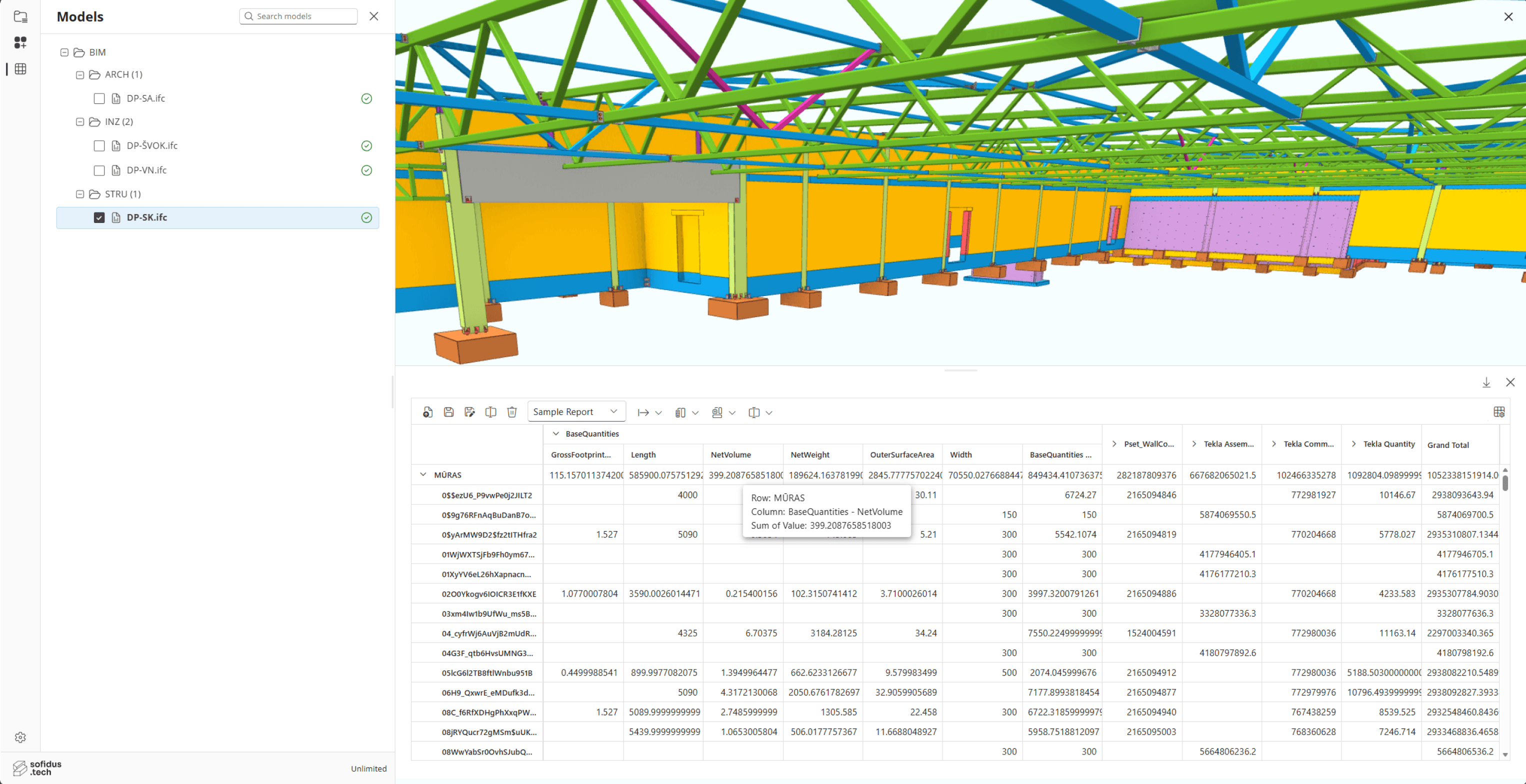
Sofidus BIM Viewer + AI Data Manager is a SharePoint-native coordination app for opening BIM models, point clouds, CAD drawings, and project files directly from controlled Microsoft 365 libraries. Teams can inspect geometry, validate revisions, and keep model review inside the same governed workspace as the rest of the project record.

It goes beyond viewing. AI Data Manager and AI Classifier workflows help teams propose metadata updates, create or extend property sets, derive values from geometry, classify selected BIM scope, and review suggested changes before they are written back into project metadata.

The result is a practical coordination workspace for technical and non-technical users alike: model and drawing review, measurements, comparison, issue tracking, and structured BIM data management in one browser-based experience.

Capabilities

Key features

01

SharePoint-Native Model & Drawing Access

Open BIM models and drawing files directly from Microsoft 365 libraries without moving content into a separate viewer platform.

  • Launch BIM, CAD, and drawing review from SharePoint command surfaces
  • Works in the browser with governed document access already in place
  • Supports combined BIM and drawing workflows, including split views
  • Keeps review activity tied to the wider CDE and document record
02

Model Review & Measurement

Inspect geometry, isolate scope, and validate dimensions directly in the browser during design and delivery reviews.

  • 3D navigation, object selection, focus tools, and sectioning
  • Measurement tools for distances, angles, and review checks
  • 2D and 3D viewing modes for discipline coordination
  • Version-aware review without relying on specialist desktop software
03

AI Data Manager

Use AI to prepare controlled BIM metadata updates instead of editing property structures manually element by element.

  • Proposes Pivot-only metadata edits for the selected BIM scope
  • Creates safe property sets and custom properties from user prompts
  • Can derive values from geometry and compare attached requirements
  • Supports review and approval before applying metadata changes
04

AI Classification & Metadata Enrichment

Classify elements and improve BIM data quality with guided AI-assisted workflows built around model metadata.

  • Select a classification system before running AI classification
  • Review proposed metadata updates before committing them
  • Works with Pivot metadata, property sets, and object-level attributes
  • Helps standardise model information across project scope
05

Coordination, Topics & BCF Review

Capture review findings in context so design, BIM, and delivery teams can coordinate against live model information.

  • Topic-based review flows with comments and assignees
  • BCF-oriented issue handling linked to model context
  • Supports markup, discussion, and status-driven follow-up
  • Keeps coordination records inside the same project workspace
06

Comparison, Drill-Through & Analysis

Move from visual model review into structured analysis so teams can inspect change, compare versions, and act on BIM data faster.

  • Model comparison workflows across versions and families
  • Drill-through from Pivot data into metadata-backed detail
  • Import and export support for structured metadata packages
  • Brings model review and BIM data operations into one toolset
Platform benefits

What teams gain with BIM Viewer + AI Data Manager

Review BIM and drawing content in SharePoint without desktop installs
Use AI to enrich, structure, and govern BIM metadata at scale
Keep model, document, and property workflows in one Microsoft 365 environment
Compare versions and coordinate issues with live project context
Reduce manual BIM data administration for project and BIM teams
Deploy through Microsoft AppSource and existing tenant governance

Turn chaos into legacy.

See how Sofidus can unify your project data, cut administrative overhead, and give every stakeholder real-time clarity.